
Jet is a dependency-free, fixed-function 3D software rasteriser written in C++17. It targets embedded hardware with limited CPU and memory, including ESP32 and STM32, and also runs on desktop PCs and Raspberry Pi.
Jet uses integer arithmetic in the rasterisation hot path and native 16-bit RGB565 colour for output to embedded displays. It supports flat-shaded, lit and textured geometry for low-poly games and visualisations.
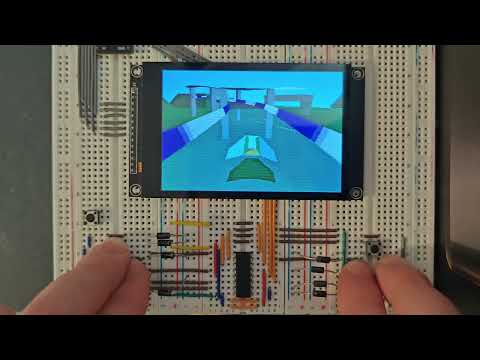
On an ESP32-S3, Jet reaches a peak throughput of 70,000 triangles/second (flat-shaded). The demo below runs at a 480×320 output resolution and 60 FPS using half-width, interlaced field buffers. Throughput varies with scene complexity, triangle size and enabled rendering features.
Share projects and get help on the Discord server.
A Wipeout-style game running on an ESP32-S3 at 60 FPS:

Compile-time switches in JetConfig.hpp let you disable features to reduce
CPU, RAM and flash usage. See src/JetConfig.example.hpp
for the available options.
- Triangle and quad meshes with per-face material assignment.
- Flat, Gouraud, Phong and wireframe shading modes (per material).
- Affine and perspective-correct texture mapping; optional bilinear filtering.
- Optional Z-buffering, or painter's-algorithm sorting (per-object and/or per-triangle).
- Backface and frontface culling, depth bias for decals and shadows, per-object blend modes (replace, add, subtract, multiply, average, XOR).
- Screen-door alpha and noise-based dithering for transparency.
- Per-object distance-based fading to reduce LOD popping and scene-wide depth fog.
- Half-width framebuffers, interlaced field buffers and checkerboard rendering with optional reconstruction.
WATER_REFLECTshading mode: animated screen-space water surface. Reflects the background sky gradient about a camera-pitch-correct waterline, with per-material ripple amplitude (specular) and vertical bias (waterYBias). Blended toward a flat tint bymaterial->alpha.ADDITIVEshading mode: saturating-add blend (src × alpha + dst) for emissive effects such as neon signs and explosion halos.SSR_FIELD_REFLECT: whenFIELD_BUFFERSis active,WATER_REFLECTsamples mirror pixels from the previous committed field buffer so reflections avoid draw-order dependencies across parallel rendering bands.- Perspective-correct Phong normal interpolation.
- Ambient and directional lights with Flat, Gouraud or Phong shading.
- Optional
Z_BRIGHTNESSdepth darkening.
- Effects without an extra buffer: CRT scanlines, cell-shading.
- Buffered effects (large-RAM targets): FXAA, bloom, motion blur, chromatic aberration, pixelation.
Primitives::create*helpers for cubes, spheres, cylinders, capsules, pyramids, grids, planes, quads and billboards.- Minimal Wavefront
.objloader. - Optional screen-space picking (compile-time bounded; zero cost when set to 0). Returns the closest hit object, triangle index, depth and snapped pixel coordinate.
- Animated palette textures:
Texture::advancePalette(dt, fps)cycles the palette offset bydt × fpsentries per call; no-op whenpaletteSizeis 0. - Custom shader entry point for extending the fixed-function pipeline.
Sprite2D draws overlays after render(). It supports textured or solid-colour
fills, colour-key transparency, alpha and additive blending, integer upscaling,
and zOrder-based draw order. On HALF_WIDTH_BUFFERS builds, sprites are
composited at full output resolution during display scanout.
ParticleSystem uses a fixed pool and renders through the rasteriser after
scene->render(). It includes spark and water-splash emitters, distance
culling, and configurable emitter counts and particle lifetimes.
LensFlare projects a directional light source to screen space and positions
a sprite chain along the axis between the sun and screen centre. Fade speed,
per-element axis offset (axisT), alpha, blend mode and integer scale are
configurable. It can use a pick slot for sun occlusion testing; with
MAX_PICK_QUERIES = 0, the sun is treated as unobstructed.
Your application provides the framebuffer, display driver and main loop.
Add Jet as a CMake subdirectory or ESP-IDF component, provide a
JetConfig.hpp on your include path (copy and customise
src/JetConfig.example.hpp), then call scene->render() once per frame.
For ESP-IDF, depend on it as you would any other component:
# main/idf_component.yml
dependencies:
jet: "*"Allocate colour and depth buffers, add a camera, lights and a cube, then render each frame:
#include "Jet.hpp"
using namespace Renderer;

// 320x240 RGB565 colour buffer + matching Z-buffer.
constexpr int W = 320, H = 240;
uint16_t color[W * H];
uint16_t depth[ZBUFFER_STRIDE(W) * H];

int main() {
    Scene  scene(color, depth, W, H);
    scene.setBackcolor(0x0000);          // RGB565 clear colour (black)
    scene.setClearBuffer(true);

    Camera camera;
    camera.setPosition(0, 0, -500);      // world units
    camera.setFOV(75, W);
    camera.nearPlane = 16;
    camera.farPlane  = 8192;
    scene.setCamera(&camera);

    DirectionalLight sun(Vector3{45, 35, 0}, Color{255, 245, 220}, 220);
    AmbientLight     amb(Color{40, 48, 64});
    scene.setDirectionalLight(&sun);
    scene.setAmbientLight(&amb);

    Material red(0xF800);                // RGB565: bright red
    red.shadingMode = ShadingMode::GOURAUD;

    Object* cube = Primitives::createCube(200, 200, 200, &red);
    cube->setPosition(0, 0, 200);
    scene.addObject(cube);

    // Per-frame: rotate, render, push the buffer to your display.
    for (;;) {
        cube->rotate(0, 1, 0);           // 1 degree per frame around Y
        scene.render();                  // colour buffer now contains the frame
        // pushToDisplay(color, W, H);   // <-- you provide this
    }
}The API reference is generated from the
Doxygen comments in src/.
To build the docs locally (requires doxygen and optionally graphviz):
cd components/Jet/src
doxygen Doxyfile
# output: components/Jet/src/docs/html/index.html
GitHub Actions publishes the documentation on pushes to the default branch.
Jet is distributed under the MIT License. The full text is in
LICENSE.
You can use, modify and distribute Jet in open-source or closed-source projects, including commercial products, without a separate licence or fee. Include the copyright and permission notices as required by the MIT License.
Submit bug reports, fixes, examples and documentation improvements through issues or pull requests on the official repository.
Before your first contribution, please read CONTRIBUTING.md. Contributions are accepted under the MIT License; no separate Contributor Licence Agreement is required.
Jet is a CubeCoders project.