

REA studies the original app and saves evidence about what it does. It does not build a new app.
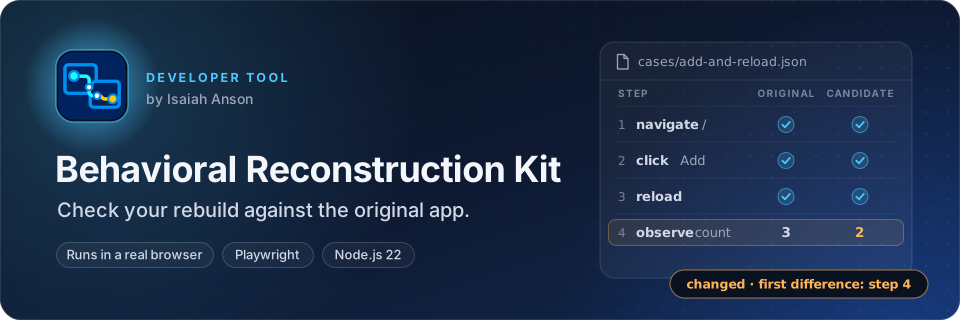
BRK checks the app you are building against the original. It runs the same steps in both apps and shows where their results differ. BRK's current checks run in a browser, so both apps need a web address. A passing check covers only the steps you choose.
Install Git, Node.js 22.19 or newer, and npm. Then run:
git clone https://github.com/IsaiahAnson/BehavioralReconstructionKit.git
cd BehavioralReconstructionKit
npm ci
npm run setup:browser
npm run demo
The browser setup installs Chromium for Playwright. The demo starts two local counter apps, runs the same click-and-reload case against each, and reports a passing comparison. You do not need to start servers yourself. If the demo also reports open, that is expected: its claim has no REA Evidence reference.
REA is separate from the browser comparison kit. Follow Set up REA with this kit when you are ready to investigate a real original app.
- Copy examples/demo to a new folder for your project, such as ../my-reconstruction. Keep your captures and reports in that folder.
- Start the original and the app you are building. Both must be reachable in a browser.
- Edit the new folder's target.json. Set original.base_url and candidate.base_url to those two addresses. Use different hosts or ports so BRK cannot compare an app with itself. Give each app the version you are testing. Record the original artifact's SHA-256 if you have a shipped file.
- Edit cases/add-and-reload.json to describe one real behavior. Change the actions, locators, and observations to match your apps. Keep each step ID unique.
- Run every case, then check the project's claims:
npm run kit -- run-all ../my-reconstruction
npm run kit -- check ../my-reconstruction
npm run kit -- triage ../my-reconstruction
run-all captures both apps and compares every case. It prints each case's result as JSON. Captures go in runs/ and comparisons go in reports/ inside your project folder. If one capture fails, BRK continues with the other cases, marks the failed case unknown, and saves its earlier run in runs/history/. Add --trace to save Playwright traces. If a page needs time to settle, add a wait_for step tied to the result you expect.
To rerun just one case, replace add-and-reload with your case ID:
npm run kit -- capture ../my-reconstruction add-and-reload original
npm run kit -- capture ../my-reconstruction add-and-reload candidate
npm run kit -- compare ../my-reconstruction add-and-reload
You can edit claim descriptions, owners, or Evidence links without capturing the browsers again. Capture again after changing an app URL, version, artifact digest, browser setting, or case steps. Runs made before this rule was added still use the older freshness check until you recapture them.
triage checks every case and claim, then returns a prioritized JSON task list. It identifies the first observed difference, stale or missing captures, and Evidence or owner gaps. An agent can use these tasks to decide what to inspect or rerun next. To let REA authenticate Evidence and evaluate reconstruction closure, provide a REA coverage workspace:
npm run kit -- triage ../my-reconstruction --rea-coverage ../my-reconstruction/coverage.jsonThe optional pass runs the pinned rea-agents@6.7.0 evaluator and adds its status, reasons, recommended probes, and Evidence IDs to the task list. REA's ready result means its declared boundary passed the supplied coverage checks; it does not show that unlisted behaviors match. Keep the coverage file with the project and update it as REA collects new Evidence. If REA rejects or cannot authenticate the file, triage exits with an error instead of reporting a pass.
Cases support observe, click, fill, press, reload, navigate, and wait_for actions. You can observe text, values, visibility, URL paths, local storage, and screenshots. Locators can use CSS, role, text, label, or test ID. Use original_locator and candidate_locator when the apps expose the same action through different elements.
| Result | Meaning |
|---|---|
| pass | The selected observations matched in the two captures. |
| changed | A selected observation differed; the report points to the first differing step. |
| unknown | A capture is missing, incomplete, or stale, or a screenshot artifact is missing or changed. Capture again. |
| open | A required claim still lacks evidence, an owner, or a passing case. |
| checks-passed | The declared required claims passed this kit's checks. This is not proof of full app equivalence. |
Once REA has produced Evidence for the original, save its full JSON record inside your project and add its file and Evidence ID to the matching claim in target.json. The REA setup guide shows the steps. The kit checks those references and an optional original artifact digest; it does not authenticate REA Evidence. For formal closure, use REA's obligation ledger.
npm test                 # Run local browser and comparison tests
npm run check:rea-mcp    # Check the pinned REA server's MCP handshake
Add --trace after original or candidate in a capture command to save a Playwright trace. Cases can observe text, values, visibility, URL paths, local storage, or screenshots. Screenshot comparison uses exact PNG bytes; use a visual assertion tool if small pixel differences should be tolerated. The kit compares only observations you list and does not normalize their values automatically.
For automation, call node src/cli.js directly: exit code 0 means pass, 2 means changed, 3 means unknown or open, and 1 means invalid input or a runtime error. On Windows, npm run kit -- ... may return npm's exit code 1 for any nonzero child result, so read the JSON status as well.
See the REA playbook for the investigation workflow and the tooling shortlist for optional tools needed by particular targets.
PolyForm Noncommercial 1.0.0. You can use, change and share BRK for free, for any purpose that does not make money. Selling it, or using it in paid work, needs my written permission.