
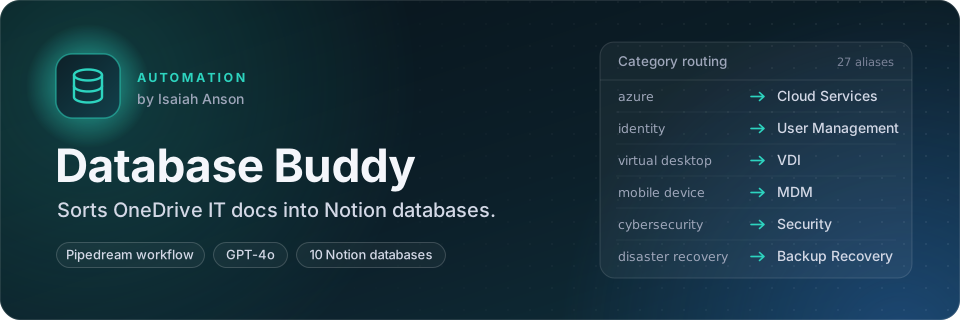

An automated IT knowledge-base builder. On a schedule, it scans OneDrive for IT documentation, classifies every document with OpenAI, and builds cleaned, deduplicated, AI-enriched Notion databases, one per IT category.
Built as a Pipedream workflow with seven custom Node.js steps. All step
code is in steps/.


Whatever label the AI or a source assigns, each record lands in one of ten Notion databases. Records whose category has no configured database are reported per item instead of failing the run.
- Scheduled scanning: recursively walks a OneDrive folder tree through the Microsoft Graph API on Monday, Wednesday and Friday at 11:00 UTC, with an exclude list and a file cap.
- AI classification: GPT-4o returns strict JSON for each document (type, key topics, technical relevance, use cases, category and a confidence score).
- Deduplication: merges OneDrive, Excel and OneNote records and removes near-duplicates by similarity, keeping the better-extracted copy. Dedup state can persist across runs in a Pipedream Data Store.
- Category routing: 27 aliases (
azure,identity,virtual desktop, …) map onto ten databases: Network Infrastructure, VDI, Applications, Hardware, Security, MDM, Cloud Services, Backup Recovery, User Management and Monitoring. - Normalization: one standard schema with ISO-8601 dates, tags split on five delimiters, and
canonical status and priority values. Unrecognized fields are kept under
metadata. - AI enhancement: a second OpenAI pass writes titles, summaries, tags, priority and optional
custom sections such as
action_items, with a fallback when the model returns bad JSON. - Notion sync: matches enhanced records back to their pages, rewrites content blocks, and can re-parent pages and archive ones that no longer have a matching record.
- Pipedream workflow (Node.js, ES modules)
- Microsoft Graph API for OneDrive
- OpenAI (GPT-4o for scanning,
gpt-3.5-turboby default for enhancement) - Notion API
- GitHub Actions syntax check for every step
- Open the share link: pipedream.com/new?h=tch_BXf12z
- Connect your Microsoft OneDrive, OpenAI and Notion accounts when prompted.
- Point the scanner at a OneDrive folder and pick the file types to include.
- Create or map the Notion databases for the categories you want, and set the schedule. This
deployment runs
0 11 * * 1,3,5(UTC).
steps/01_comprehensive_onedrive_processor.js
Walks the folder tree (/items/{id}/children), filters by MIME type (Word, PDF, plain text,
Markdown, OneNote) and extracts content. Plain text and Markdown are read in full; binary formats
are captured as structured metadata descriptors. Each document goes to GPT-4o for classification,
near-duplicates are dropped by Jaccard word-set similarity, and the step emits one of three output
shapes (json, summary, knowledge_base) with per-run metrics.
steps/02_clean_and_deduplicate_data.js
Merges records from up to three sources (OneDrive scan, Excel exports, OneNote content), normalizes text, and removes duplicates by percentage similarity in configurable batches.
steps/03_create_specialized_it_databases.js
Creates Notion databases at the workspace level, which avoids failures from archived parent pages. Properties are defined as JSON and support title, select, multi-select, number, date, people, files, checkbox, URL, email, phone, relation and rollup types.
steps/04_populate_specialized_databases.js
Routes each record to its database through the category map, builds full page properties and body blocks, and reports created pages and per-category counts.
steps/05_normalize_database_records.js
Resolves field names case-insensitively against candidate lists (title/name/subject/…),
normalizes second and millisecond timestamps to ISO-8601, and maps status and priority values to
canonical vocabularies ("done" → completed, "blocker" → critical).
steps/06_enhance_individual_records.js
Produces an enhanced title, detailed summary, categories, suggested tags, priority and content type per record, plus any caller-defined custom sections.
steps/07_update_notion_pages_with_enhanced_content.js
Matches records to pages by page ID, title or original ID, updates properties, and appends or replaces formatted content blocks.
- No secrets in code. Authentication goes through Pipedream's managed app connections
(
microsoft_onedrive,openai,notion). Nothing in this repo holds credentials. - Fail-soft. Every step collects per-item errors instead of throwing, so one bad document never stops a run.
- Configurable. Similarity thresholds, batch sizes, file caps, output formats and custom AI sections are exposed as step props.
- Known limitation: PDF, Word and OneNote content is analyzed from metadata descriptors, not full binary text extraction. A document-parsing service such as Azure Document Intelligence is the natural next step.
steps/          source of each workflow step, exported from Pipedream
docs/images/    README diagrams
.github/        CI (syntax check for every step)
Copyright (c) 2026 Isaiah Anson. All rights reserved. You may use the released software for personal, non-commercial use; copying, modifying or redistributing it requires written permission. See LICENSE.