Skip to content

Add native Minecraft launcher, unified profiles, and Worlds dashboard - #297

Open
AntonSelin wants to merge 9 commits into
Osiris-Team:masterfrom
AntonSelin:feat/native-client-profiles
Open

AntonSelin wants to merge 9 commits into
Osiris-Team:masterfrom
AntonSelin:feat/native-client-profiles

Conversation

@AntonSelin

@AntonSelin AntonSelin commented Oct 3, 2026 •

Copy link
Copy Markdown

Closes #296. Adds a native Minecraft launcher and one FlatLaf dashboard for clients, reusable mod/plugin profiles, existing singleplayer saves, managed dedicated-server worlds and AutoPlug's existing server controls. The implementation starts from master 10.2.0, uses no HMCL code and adds no dependencies.

Behavior

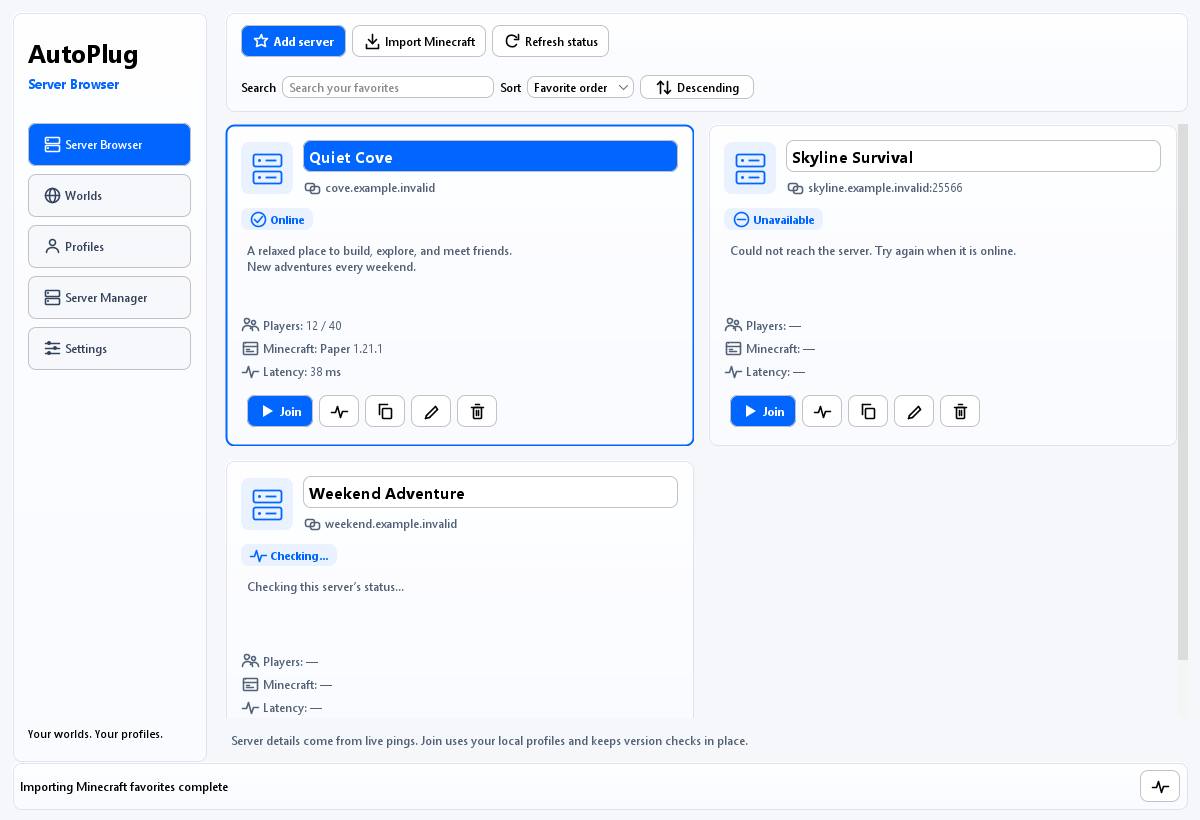
  • Server Browser imports vanilla favorites without rewriting them. Full-width cards show server-provided icons, colored status, MOTD, players, version and latency. Generic names fall back to the address; last joined is the default sort. Join supports compatible profile selection or clone → reviewed migration → launch.
  • Worlds combines discovered singleplayer saves and managed worlds, newest activity first. Bounded metadata discovery leaves existing saves untouched. Local Vanilla launch preserves the exact recorded version, uses Quick Play or the supported native legacy-entry helper, and leaves local games running when AutoPlug exits. Unknown versions require an explicit choice; known modded saves retain their original setup.
  • Profiles isolate MODS, PLUGINS and MODS_SERVER collections, configuration, templates, migration state and process locks. Updates reuse existing providers with staged verification, rollback and explicit disabling of unresolved artifacts. Removal is recoverable.
  • Defaults include Vanilla client/server and a conservative Fabric client-utility preset: Fabric API, Sodium, Entity Culling, ImmediatelyFast, Mod Menu and required dependencies. It resolves exact-version releases and installs transactionally on first launch. Modrinth, CurseForge and AutoPlug installer links are available in Profiles.
  • Native game preparation uses publisher metadata, up to eight concurrent downloads, integrity-checked cache reuse, ordered native extraction, bounded retries, Fabric/Quilt metadata, official Forge/NeoForge installers and version-specific Java runtimes. Fullscreen defaults on. Offline names and Microsoft device authentication are supported; Microsoft requires an authorized registered public application ID.
  • Each managed world owns a cloned packaged AutoPlug child, independent configuration, server process and console. Start/stop/restart, backup, help, status and configuration controls are in Server Browser. Startup waits for loopback readiness and graceful shutdown covers owned descendants. Server EULA acceptance and sharing are explicit. UPnP uses an owned lease and forwarding endpoint; offline sessions remain loopback-only.
  • The light dashboard has rounded cards and blue accents, preserves dark themes, remembers per-server/world client choices, and offers a large two-second chooser with an abort button. Estimated overall progress fills the status background; measured file bytes and source URLs remain available in details.

Validation

Final revision fdc3c95: 189 focused automated cases, 188 passed, 1 Windows symbolic-link fixture skipped, 0 failures/errors. Java 9 release compilation and Maven packaging passed. Tests cover profile/migration/asset integrity, parallel downloads and cancellation, account fixtures, native/legacy launch contracts, server status/icons/history, world ordering, chooser persistence/countdown, UI lifecycle/layout and isolated console/process control.

The actual packaged-wrapper smoke started two offline fixture servers, routed commands independently, restarted one, stopped it gracefully and verified automatic wrapper shutdown when the other native server stopped. The smoke helper is included for reproduction. Thirty fixture renders were inspected across Light/Dark and 1200×820/950×620, including profile descriptions, Settings, server rows, managed consoles, chooser and progress.

Validation limits: this final revision does not claim interactive Minecraft gameplay with the utility preset, Microsoft sign-in, authenticated multiplayer joining or a live household router test. Publisher metadata compatibility is not proof of a mod pack's runtime behavior. Existing unrelated Steam/network tests were excluded. Server “last joined” records a successfully started client, not confirmed admission by the remote server. Overall progress is explicitly estimated.

AI disclosure: this contribution was predominantly generated, inspected, cross-reviewed and tested with Codex agents. No human acceptance test is claimed.

Operating guide, reproducible checks and current previews

Current dashboard previews (synthetic fixture data)

Server Browser
Worlds
Profiles
Managed console

@Osiris-Team

Osiris-Team commented Oct 4, 2026 •

Copy link
Copy Markdown
Owner

@AntonSelin This is exceptional work. The architecture, clean-room MIT implementation, reuse of existing AutoPlug services, and thorough test coverage are spot-on and address the requirements cleanly.

Before we proceed with the final review and merge, we would like a few visual and UX refinements:

  1. Modern Visual Polish (Rounded Corners & Theming):

    • The current FlatLaf layout is functional, but let's give it a more modern, sleek look. Please introduce rounded corners on cards, panels, and buttons (e.g., leveraging FlatLaf's arc properties: JComponent.ROUNDED_BORDER / arc=16).
    • Add a tasteful Minecraft-themed background (e.g., a subtle dark panorama/artwork with semi-transparent, frosted/blurred cards over it) to make it feel like a polished modern gaming client.
  2. "Virtual Worlds" $\to$ "Worlds" + Vanilla Saves Detection:

    • Rename the "Virtual Worlds" tab to simply "Worlds".
    • In this tab, in addition to AutoPlug-managed background-server worlds, please also discover and list the player's existing regular singleplayer worlds (scanned from standard .minecraft/saves). Players should be able to see, select, and launch their standard local worlds alongside virtual server worlds from one unified place.

Once these UI/Worlds additions are pushed in a follow-up commit, we'll run the live validation and proceed with the review. Great work so far! Very promising!

@AntonSelin AntonSelin changed the title Add native Minecraft launcher, unified profiles, and virtual worlds Add native Minecraft launcher, unified profiles, and Worlds dashboard Oct 4, 2026
@AntonSelin

Copy link
Copy Markdown
Author

Thanks for the detailed review. I've pushed the requested follow-up in 14c276f:

  • Rounded cards, panels and buttons (arc 16), with an original block-landscape backdrop and translucent surfaces in both themes.
  • Renamed the tab to Worlds and added standard .minecraft/saves discovery alongside managed worlds. Local saves show their recorded version and icon, use the exact same Vanilla build, and use Quick Play where the version metadata supports it. Older versions open at Singleplayer with guidance; unknown versions require an explicit original version, and known modded saves stay with their original launcher.
  • Local games remain running when AutoPlug quits so their integrated server can save normally. No existing saves were opened or modified during development.

The follow-up build and package passed. The targeted suite had 81 passes, 1 symbolic-link fixture skipped by Windows permissions, and no failures/errors. All five views were visually checked at 1200x820 dark and 950x620 light. Updated fixture screenshots and the operating guide are linked in the PR description. Live authentication and actual local-world gameplay remain for your validation.

If review and merge go well, would PayPal payout today before 21:58 UTC be feasible? I understand this depends on your review and payout process; the payment address is already in my GitHub profile.

@Osiris-Team

Copy link
Copy Markdown
Owner

@AntonSelin Thanks for the quick turnaround! The Worlds tab implementation and vanilla save handling are working nicely.

Looking at the rendered UI, we’d like one final visual pivot to give it a much cleaner, modern desktop feel:

  1. Light Mode & Clean Canvas (Drop the Background):
    • Make Light Mode the default/primary theme.
    • Remove the Minecraft block-landscape/panorama background completely. Use a clean, minimalist flat canvas (soft neutral/off-white background) instead.
  2. Keep the Roundness & Blur:
    • Keep the arc: 16 rounded corners on cards, panels, and buttons.
    • Retain the soft frosted/blur panel styling and subtle borders.
  3. New Blue Accent:
    • Introduce a vibrant, modern Blue accent (e.g., #0066FF / #0984E3 or similar) for primary action buttons, active navigation tabs, focus highlights, and badges.

Regarding Payout:
Yes, once this styling update is committed, we will do the final review and merge. If everything checks out cleanly, we will process the €50 payout today to the PayPal address on your GitHub profile well within your requested timeframe.

@AntonSelin

Copy link
Copy Markdown
Author

Pushed the final styling update in 74a62fa.

Light is the default/primary presentation, with a solid off-white canvas and no landscape artwork. Cards retain the soft frosted appearance and arc 16 corners. Primary actions, active navigation, focus highlights and world badges now use the blue accent. Explicit dark/Darcula preferences remain supported, including refreshing table colors after a theme change.

All 7 dashboard tests and the Java 9 build/package passed. I checked all five compiled views at 1200x820 Light and 950x620 Light/Dark; the PR screenshots and guide now show the final light design. The previously validated world-launch implementation is unchanged in this styling commit.

Thanks for confirming the payout timing, subject to final review. Ready for your validation.

@Osiris-Team

Copy link
Copy Markdown
Owner

@AntonSelin my first review is below, please fix:

Functional Defects

DEF-1 — Quick Play not supported for Minecraft < 1.20 (must fix at source)

Observed log:

[04-10-2026 18:48:33][AP][INFO] Minecraft 1.18.2 has no supported
singleplayer Quick Play argument. Select 'New World (5)' manually in
Singleplayer.

Problem: The singleplayer Quick Play argument was introduced in Minecraft 1.20; older supported versions (1.16.5, 1.17.1, 1.18.2, ...) have no such argument. Current code detects this but surfaces an INFO/error message telling the user to manually pick the world. That is not a source fix and degrades UX.

Requested: Fix at source / add a workaround that keeps UX intact and supports every supported Minecraft version.


UX / UI Improvement Requests

UX-1 — Progress feedback when launching a world / virtual world or doing anything else long running in the UI

  • No progress bar today; logs already contain step info (JRE resolve -> manifest fetch -> libraries -> assets -> natives -> loader install -> launch).
  • Requirement: a smart progress bar that never appears frozen — real progress or animated indeterminate state with a live sub-step label.

UX-2 — Always show the download source URL

  • For every download (Mojang manifest, libraries, assets, loaders, JRE, mods/plugins) show the source URL in the UI and the logs. LauncherFiles.text(url) and TaskDownload already have the URL.

UX-3 — Use icons more aggressively

  • Server Browser page especially should use clean icons for favorite, copy address, ping, refresh, open folder, play, share, edit, delete. etc Keep tooltips for accessibility.

UX-4 — Update "PLAY / MANAGE / SHARE" with the tab title on navigation

  • Replace the static band with the current tab name on navigation (remove the current per-page top title bar) — frees a full row of vertical space per page.

UX-5 — Worlds: show more metadata

  • Surface what bounded readers already expose: game version, modded flag, last-played time, save size, world icon, datapack/cheats/hardcore flags, Quick-Play-eligible badge when applicable.

UX-6 — Settings: eliminate giant whitespace blocks

  • Reflow settings; 2-column layout on wide windows, responsive grouping, rare options under an "Advanced" disclosure.

UX-7 — Sensible defaults & auto-initialization

  • A default profile must exist out of the box so users never see "Create a MODS profile in Profiles before joining a server" — an absurd requirement for a normal flow.
  • On first launch or when there is no default present: auto-create a Default (VANILLA) client profile matching the selected Minecraft version, and a Default profile for the server browser / virtual worlds.
  • Empty mods/ / plugins/ directories should show an onboarding empty-state, not an error.
  • Worlds: auto-own a world-<uuid> entry for any locally-installed save launched through AutoPlug.

@Osiris-Team

Osiris-Team commented Oct 4, 2026 •

Copy link
Copy Markdown
Owner

@AntonSelin give me some quick feedback if you are currently working on this

@AntonSelin

Copy link
Copy Markdown
Author

Pushed the review changes in c15a94a.

  • DEF-1: pre-Quick-Play Vanilla launches now install a small Java 8 startup helper that schedules Minecraft’s own integrated-world entry on the game thread. This replaces the manual Singleplayer instruction for the mapped 1.14–1.19 API families, including 1.16.5, 1.17.1 and 1.18.2. Older 1.7.10, 1.8.9, 1.12.2 and 1.13.2 use adapters pinned to the original client hashes. The helper waits for the title screen, preserves the original save name/location, rechecks the save before entry and reports compatibility errors or timeouts. Other pre-mapping builds are explicitly unsupported; I am not claiming every historical snapshot works.
  • UX-1/2: live step labels, animated progress when totals are unknown, measured byte progress, current/copyable source URL and an activity history. Source events reach the logs too, with credential-like URL values redacted. This also covers the separate mod, plugin and Java updater download loops, redirects and failure cleanup.
  • UX-3/4: action icons with labels/tooltips and the selected tab name in the header band; redundant page title rows removed.
  • UX-5: bounded world metadata now includes version, modded status, last played, size, icon, datapacks, cheats/hardcore and native Quick Play eligibility.
  • UX-6: compact responsive Settings grouping, two columns on wide windows and optional runtime overrides under Advanced.
  • UX-7: reusable version-specific Vanilla client/server defaults, empty-collection onboarding and metadata-only world-<uuid> ownership for launched local saves. Existing saves stay in place and old local: aliases still resolve. EULA acceptance remains explicit.

Validation: the focused integration run completed 130 cases with no failures/errors and one Windows symbolic-link fixture skipped. A final 13-case downloader run added the cache-copy failure case and passed; across these runs that is 131 distinct cases, 130 passed and one skipped. Packaging passed, and the packaged launcher/helper class versions are Java 9/Java 8 respectively. I also checked 20 rendered dashboard previews across light/dark themes and 1200×820 / 950×620 windows.

Legacy entry is validated with exact publisher mapping fixtures, original client-bytecode inspection and forked contract clients. Full interactive Minecraft world loading/gameplay was not verified here. The documentation states that limitation and the supported older adapters.

Updated screenshots and behavior notes are included for review.

@Osiris-Team

Osiris-Team commented Oct 4, 2026 •

Copy link
Copy Markdown
Owner

@AntonSelin please overwork the "Server Browser" and also use nice cards with icons instead of a table here
-> I forgot this in my last comment

@AntonSelin

Copy link
Copy Markdown
Author

I'm updating Server Browser to use responsive cards with icons, while keeping the existing server actions and status details. I'll check the populated layout in light/dark themes and compact/wide windows before pushing the follow-up.

@AntonSelin

Copy link
Copy Markdown
Author

Pushed the Server Browser redesign in 9fffb57.

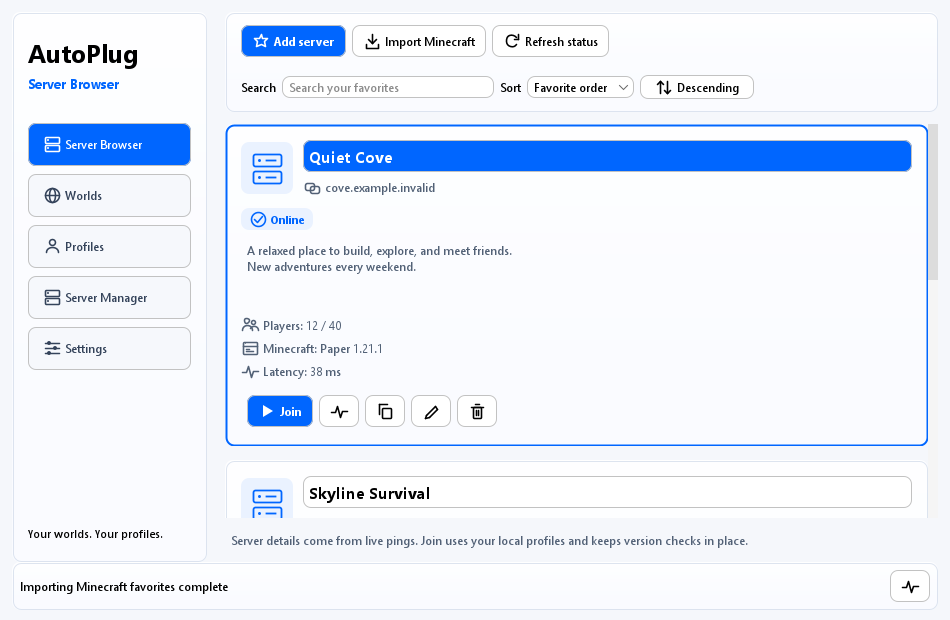
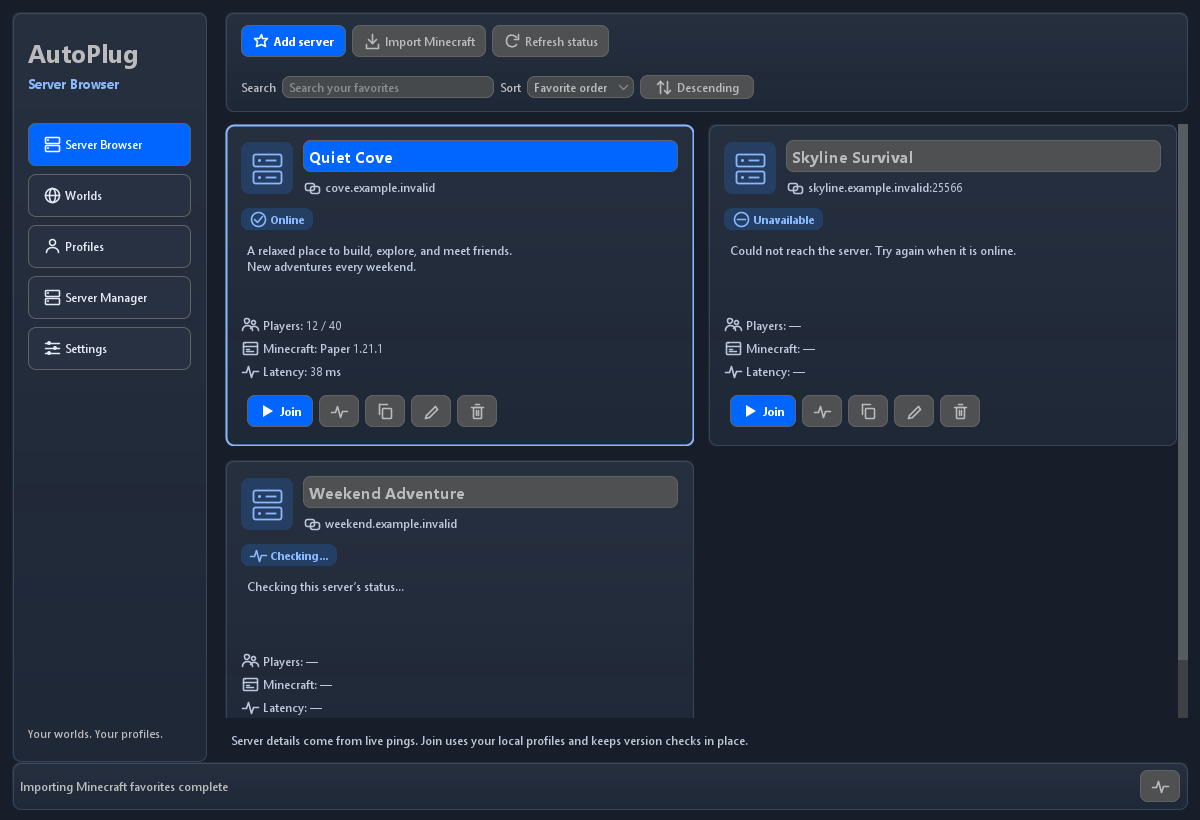
Favorites now use rounded cards with original server/action icons: two columns in wide windows and one column in compact windows. Each card shows its address, connection state, MOTD or failure reason, players, Minecraft version and latency, with Join, Ping, Copy address, Edit and Remove alongside it. Add, Import Minecraft and Refresh status remain at the top. Search, sorting and keyboard navigation are included; selection stays tied to the server address across refreshes and asynchronous default-profile preparation.

The final package and all 18 focused tests passed (14 dashboard, 4 server-browser). Tests cover action targeting, stale-ping rejection, keyboard join, filtering/sorting, responsive bounds and literal rendering of server-supplied text. I checked populated Server Browser previews in light/dark themes at 1200×820 and 950×620. These use deterministic online/unavailable/checking fixtures, not live server connectivity.

Server Browser cards in the primary light theme

Compact layout · Dark theme

@AntonSelin

Copy link
Copy Markdown
Author

With the requested Server Browser cards now in place, I believe the current PR is a solid deliverable for the agreed €50 bounty. I’ve put substantial effort into the original implementation and successive review rounds: the Worlds integration, legacy-world launch support, the visual refinements, progress and defaults, and now the additional Server Browser redesign.

The earlier integration validation recorded 130 passes and one Windows-specific fixture skip across the documented runs. The latest card revision passed all 18 focused tests and packaging, with populated light/dark previews checked at both window sizes. I’ve kept the remaining live gameplay and sign-in validation limits explicit rather than claiming checks I haven’t performed.

Could you please complete the final validation and, if there are no blocking functional issues, accept and merge the current PR and process the agreed €50 PayPal payment? I’d appreciate bringing this bounty to completion. The payment address is anton.selin.cc@gmail.com, as listed on my profile.

If anything remains, please distinguish a concrete blocking issue from optional polish we could track separately. That would help us close out the agreed work while keeping further improvements clear.

@Osiris-Team

Copy link
Copy Markdown
Owner

@AntonSelin I appreciate the work, but your PR does not seem like it was tested by a human. I am doing substantial testing from my side which defeats the purpose of a bounty if I have to do work. Right now if I'm being honest we are 10% through the review, please fix this:

Exception in thread "AWT-EventQueue-0" java.lang.NullPointerException: Cannot store to object array because "this.xChildren" is null
at java.desktop/javax.swing.BoxLayout.checkRequests(BoxLayout.java:480)
at java.desktop/javax.swing.BoxLayout.preferredLayoutSize(BoxLayout.java:293)
at java.desktop/java.awt.Container.preferredSize(Container.java:1826)
at java.desktop/java.awt.Container.getPreferredSize(Container.java:1810)
at java.desktop/javax.swing.JComponent.getPreferredSize(JComponent.java:1736)
at com.osiris.autoplug.client.ui.DashboardPanel$ResponsiveSettings.getPreferredSize(DashboardPanel.java:825)
at java.desktop/javax.swing.ScrollPaneLayout.layoutContainer(ScrollPaneLayout.java:799)
at java.desktop/java.awt.Container.layout(Container.java:1541)

@AntonSelin

Copy link
Copy Markdown
Author

You're right: this is a functional blocker, and my automated checks missed it. I have not provided human acceptance testing. I'm sorry that this added testing work on your side.

Fixed in 7bdd015. A wrapped-text measurement can synchronously invalidate its ancestor while BoxLayout is filling its size arrays, leaving xChildren null. I replaced the nested Settings stacks with GridBagLayout and removed the same pattern from the world-card list.

I added a regression that reproduces your exact BoxLayout -> ResponsiveSettings -> ScrollPaneLayout exception on the previous code and passes with this fix. I also added and ran a separate Windows test with actual hidden JFrame peers and a validated component hierarchy: both themes, repeated wide/compact resizing, Advanced collapse/reopen, preserved edits, scrolling to the final runtime field, eight world cards and uncaught EDT exception capture. This covers the window-validation path that the earlier offscreen renders missed.

The final run passed all 20 focused tests with no skips, and packaging passed. I checked eight updated Settings/Worlds fixture renders. These remain automated checks; full interactive gameplay and Microsoft sign-in are still unverified. The reproduction and window-lifecycle tests are committed, with the run command documented in docs/native-launcher.md.

@Osiris-Team

Copy link
Copy Markdown
Owner

@AntonSelin

  • Worlds should be sorted by creation/update date (whatever is newer), when creating a new one it should thus be displayed at the top.
  • When I said use Cards in the "Server Browser" I meant similar card that you used in the "Worlds" tab, also use different colors for when a server is online vs offline and get their icons. It also defeats the idea of a bounty if I have to be this specific about basic stuff, I need a bit more forward thinking from you about basic UI/UX things, please do a deep analysis of everything we got now and how we can expand upon it to achieve basic UI/UX user satisfaction.
    -> Also if the name is simply "Minecraft Server" replace it by the domain or ip.
  • There should be an additonal default fabric profile with the most downloaded utility mods that do not change the game that much so that they can be used on regular servers as well, select them from this list:
    ⭐️ Most downloaded mods

Fabric API
Lightweight and modular API providing common hooks ...

Sodium
A high-performance rendering engine replacement for...

Iris Shaders
A modern shader pack loader for Minecraft intended ...

Entity Culling
Using async path-tracing to hide Block-/Entities th...

Cloth Config API
Configuration Library for Minecraft Mods

FerriteCore
Memory usage optimizations

Mod Menu
Adds a mod menu to view the list of mods you have i...

Lithium
No-compromises game logic optimization mod, useful ...

ImmediatelyFast
Speed up immediate mode rendering in Minecraft

YetAnotherConfigLib (YACL)
A builder-based configuration library for Minecraft...

Fabric Language Kotlin
This is a mod that enables usage of the Kotlin prog...

Xaero's Minimap
Displays a map of the nearby world terrain, players...

[ETF] Entity Texture Features
Emissive, Random & Custom texture support for entit...

Architectury API
An intermediary api aimed to ease developing multip...

Xaero's World Map
Adds a full screen world map which shows you what y...

Sodium Extra
A Sodium addon that adds features that shouldn't be...

[EMF] Entity Model Features
EMF is an, OptiFine format, Custom Entity Model rep...

AppleSkin
Food/hunger-related HUD improvements

VeinMiner
Mine the whole vein on mining a single ore/block. M...

Not Enough Animations
Bringing first-person animations to the third-perso...

  • The "Profiles" tab should contain buttons/links to the most popular modding sites like modrinth etc for quick mod downloads and autoplug.one/installer/mods
  • Downloading minecraft/assets etc is very slow, increase via multithreading multiple downloads at once
  • The loading bar sucks, I imagined a background loading bar behind the text, also make it a continues loading bar for the complete process, not a indidivual loading bar for each small step. also remove the intermediate loading bar, as I said instead make it a fake slow minimal load progress in those cases which gets slower every time
  • persistence of UI state is also very important, for example it should remember what profile I used to join a server/world before and select that by default the next time and the buttons should cover the whole width of the popup and be large for easy selection with a countdown of 2 seconds with auto launch if a base profile was already selected and a large red "Wait, let me select something else..." button showing the countdown and allowing its abortion. as you can see the whole interactions should be minimal for the user and seamless but still allow for configuration/customization etc. the amount of clicks everywhere in the UI that I need to do to get shit done is crazy.
  • "Server browser" must also be sorted by last played/joined by default
  • launch of the game should automatically be in full screen or at least windowed full screen by default
  • im not sure what a virtual word / managed world uses as the server jar, but it should be the autoplug client jar cloned and I should have easy access to its console etc via an additional button in the UI that links/navigates to server browser, which thus must be able to support multiple autoplug sub-instances and provide the same features

This is hopefully the last review I have to do, if the next commit does not satisfy me I will have to close this PR and move to the next candidate PR.

@AntonSelin

Copy link
Copy Markdown
Author

I've completed the requested final revision in fdc3c95. This is my final revision for this bounty.

  • Worlds now sorts by newest creation/update/play activity. Server Browser uses full-width rows styled like Worlds, with online/offline colors, bounded server-provided icons and an address fallback for “Minecraft Server”. Last joined is the default sort; overlapping pings cannot replace a newer result.
  • Added Default (FABRIC) with Fabric API, Sodium, Entity Culling, ImmediatelyFast and Mod Menu, plus required dependencies. First launch resolves stable releases for the exact Minecraft version, verifies and stages every artifact, and activates the collection together. Startup itself remains offline. Profiles also links to Modrinth, CurseForge and AutoPlug's mod installer.
  • Independent Minecraft files download concurrently with eight bounded workers, cache reuse, bounded retries and cancellation. The loading fill sits behind the status text, advances continuously across the operation with slowing estimated progress, and finishes only on success. Measured file progress remains in the tooltip.
  • Server/world profile choices persist. The chooser has large full-width buttons, a two-second preferred-profile launch countdown and the red “Wait, let me select something else…” cancellation button. Fullscreen is the default and can be switched off in Settings.
  • Managed worlds now run cloned copies of the packaged AutoPlug client, each with its own configuration and native server command. Worlds → Console opens Server Browser's managed-instance tab with a selector, separate output/input, start/stop/restart, backup, help, status and configuration controls. Profile-managed updater settings remain pinned to prevent a child silently changing the selected pack.

Validation: 189 focused cases, 188 passed, one Windows symbolic-link fixture skipped, no failures/errors; Maven package passed. The actual packaged-wrapper smoke started two separate fixture servers, verified command isolation, restarted one, gracefully stopped the first, then confirmed a raw server stop also shuts down the second AutoPlug wrapper without a shutdown-lock deadlock. The reproducible smoke helper and updated operating guide are included. I also checked 30 Light/Dark, wide/compact fixture renders, including the chooser, managed console, progress and first-launch utility description.

These checks cover the packaged process lifecycle and UI fixtures. They do not establish interactive gameplay with the utility pack, Microsoft sign-in, a live authenticated join or real-router sharing. The contribution and checks remain AI-assisted; I am not claiming human play-testing.

Updated guide and previews

Sign up for free to join this conversation on GitHub. Already have an account? Sign in to comment

Labels

None yet

Projects

None yet

Development

Successfully merging this pull request may close these issues.

Native Client Launcher, Server Browser & Unified Profile Engine

2 participants