
The MFA Plugin provides Two-Factor Authentication for GP247 system, enhancing user account security. The plugin supports multiple guards (customer, admin, vendor, pmo...) for flexible user authentication management.
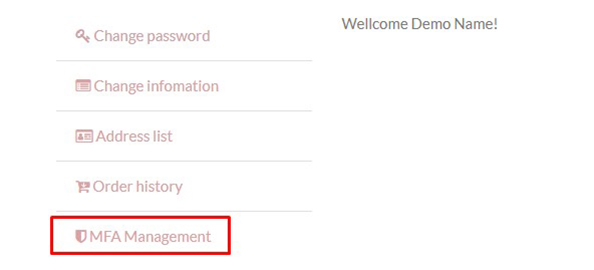
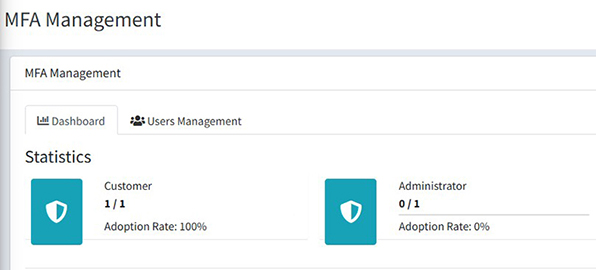
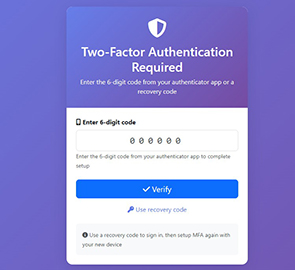
- ✅ Two-factor authentication using TOTP (Time-based One-Time Password)
- ✅ Multiple guards support: customer, admin, vendor, pmo
- ✅ Easy-to-scan QR codes with authenticator apps
- ✅ Recovery codes for device loss scenarios
- ✅ MFA management from Admin panel
- ✅ Usage statistics by guard
- ✅ Optional forced MFA per guard
- ✅ Responsive and user-friendly interface
- ✅ Multi-language support (Vietnamese, English)
- GP247 Core >= 1.2
- Laravel 12.x
- PHP >= 8.2
- Required packages:
- pragmarx/google2fa: ^8.0 or ^9.0
- bacon/bacon-qr-code: ^2.0 or ^3.0
Add the required packages to your main project's composer.json:
composer require pragmarx/google2fa
composer require bacon/bacon-qr-codeImportant: Run this command in the root directory of your GP247 project, not inside the plugin folder.
There are 4 methods to install the plugin:
- Navigate to "Extensions" in the admin dashboard
- Select "Plugins"
- Choose the "Install from Library" tab
- Find "MFA" plugin and click "Install"
- Click "Enable" to activate the plugin
- Access Admin Panel > Extensions > Plugins
- Select the "Import file" tab
- Choose the MFA plugin zip file
- Complete the import process
- Click "Enable" to activate the plugin
In case you encounter difficulties importing the zip file (e.g. upload errors, temporary file issues, etc.):
-
Unzip and copy the source code folder to the corresponding directory:
app/GP247/Plugins/MFA -
Copy the
MFA/publicfolder to the corresponding public path:public/GP247/Plugins/MFA -
Access Admin Panel > Extensions > Plugins
-
In the default "Local storage" tab, find "MFA" and click "Install"
-
Click "Enable" to activate the plugin
Since gp247 3.x you can download MFA from the GP247 library and install it straight from the command line, without opening the admin. Step 1 must be done first (composer require pragmarx/google2fa bacon/bacon-qr-code), otherwise the command stops because the packages are missing. Open a terminal in the website's root folder and run:
# 1) Once per website: register the (free) API License that connects the site to the GP247 library
php artisan gp247:ext-register-license

# 2) Download the plugin from the library and install it
php artisan gp247:ext-install --type=plugin --key=MFA- Before step 1, make sure
APP_URLin.envis the website's real domain (nothttp://localhost) — the license is bound to that domain. - Once installed, the plugin is enabled and caches are refreshed automatically; you no longer need to click Install/Enable in the admin.
- The command checks the requirements declared in
gp247.json(core version, composer packages, required plugins) and stops with a clear message if something is missing (e.g.pragmarx/google2faorbacon/bacon-qr-codeis not installed). - If the folder
app/GP247/Plugins/MFAis already on the server (copied manually or shipped with the installer), the command installs it in place instead of downloading it again. - The command refuses a plugin that is already installed. To move to a newer version, run
php artisan gp247:ext-update --type=plugin --key=MFA. - Append
--jsonto get machine-readable output (for scripts/CI). - The post-install configuration steps below (Step 3) still apply.
- More: Installing Plugins & Templates · Command reference.
Reference: Guide to Installing the Extension
After successful installation, the MFA plugin will appear in the menu: Admin Panel > System Configuration > Security > MFA
To configure the plugin, edit the file: app/GP247/Plugins/MFA/config.php
Default: The plugin is only enabled for the admin guard.
Configuration parameters for each guard:
- enabled:
1= enabled,0= disabled MFA for the guard - forced:
1= mandatory,0= optional (users can enable/disable MFA) - model: User model class
- qr_code_size: QR code size (100-500px)
- recovery_codes_count: Number of recovery codes (4-20)
- window: Time window allowance (0-5, recommended 1)
Example configuration:
'guards' => [
    'customer' => [
        'enabled' => 0,  // Disable MFA for customer
        'forced' => 0,
        // ... other parameters
    ],
    'admin' => [
        'enabled' => 1,  // Enable MFA for admin (default)
        'forced' => 0,   // Not mandatory
        // ... other parameters
    ],
],Note: After editing the config file, clear the cache:
php artisan config:clear
php artisan cache:clear- Go to MFA management page:
/mfa/setup/customer - Scan QR code with authenticator app (Google Authenticator, Authy, Microsoft Authenticator, etc.)
- Enter 6-digit code from app to verify
- Save recovery codes in a secure place
- Login with username/password as usual
- After successful login, system will require MFA code
- Enter 6-digit code from authenticator app
- Or use 8-character recovery code if device is lost
- View MFA status:
/mfa/manage/customer - View recovery codes:
/mfa/recovery-codes/customer - Regenerate recovery codes: From MFA management page
- Disable MFA: From MFA management page (requires password confirmation)
- Access Admin Panel > Extensions > MFA
- View MFA adoption rate by guard
- See total users and enabled users
- Enable/disable MFA for each guard
- Force users to enable MFA
- Adjust technical parameters
- From MFA management page, admins can reset MFA for any user
- User will need to setup MFA again from scratch
┌─────────────────────────────────────────────────────────────┐
│                    User Login Success                        │
└────────────────────────┬────────────────────────────────────┘
                         │
                         ▼
                ┌────────────────────┐
                │  MFA Enabled for   │
                │  this guard?       │
                └────────┬───────────┘
                         │
        ┌────────────────┴────────────────┐
        │ No                               │ Yes
        ▼                                  ▼
┌───────────────┐              ┌────────────────────┐
│  Allow Access │              │ User enrolled MFA? │
└───────────────┘              └─────────┬──────────┘
                                         │
                        ┌────────────────┴────────────────┐
                        │ No                               │ Yes
                        ▼                                  ▼
              ┌──────────────────┐              ┌──────────────────┐
              │  MFA Forced?     │              │ Session verified?│
              └────────┬─────────┘              └────────┬─────────┘
                       │                                 │
         ┌─────────────┴──────────┐           ┌─────────┴─────────┐
         │ No          │ Yes      │           │ No     │ Yes      │
         ▼             ▼          │           ▼        ▼          │
    Allow Access   Redirect      │      Redirect  Allow Access   │
                   to Setup      │      to Verify                │
                       │          │           │                   │
                       ▼          │           ▼                   │
              ┌─────────────┐    │   ┌─────────────────┐        │
              │ Show QR Code│    │   │ Enter 6-digit   │        │
              │ & Secret    │    │   │ code or         │        │
              └──────┬──────┘    │   │ recovery code   │        │
                     │           │   └────────┬────────┘        │
                     ▼           │            │                  │
              ┌─────────────┐    │            ▼                  │
              │ Verify Code │    │   ┌─────────────────┐        │
              └──────┬──────┘    │   │  Code Valid?    │        │
                     │           │   └────────┬────────┘        │
                     ▼           │            │                  │
            ┌─────────────────┐ │   ┌────────┴────────┐        │
            │ Generate        │ │   │ No    │ Yes     │        │
            │ Recovery Codes  │ │   ▼       ▼         │        │
            └────────┬────────┘ │  Error  Set         │        │
                     │          │         Session     │        │
                     ▼          │         Verified    │        │
            ┌─────────────────┐ │            │        │        │
            │ Show & Save     │ │            ▼        │        │
            │ Recovery Codes  │ │    ┌──────────────┐ │        │
            └────────┬────────┘ │    │Allow Access  │ │        │
                     │          │    └──────────────┘ │        │
                     ▼          │                      │        │
            ┌─────────────────┐ │                      │        │
            │ MFA Activated   │ │                      │        │
            └────────┬────────┘ │                      │        │
                     │          │                      │        │
                     └──────────┴──────────────────────┘        │
                                │                               │
                                └───────────────────────────────┘
┌─────────────────────┐
│ User Login          │
│ (Email + Password)  │
└──────────┬──────────┘
           │
           ▼
┌──────────────────────┐
│ Credentials Valid?   │
└──────────┬───────────┘
           │
    ┌──────┴──────┐
    │ No   │ Yes  │
    ▼      ▼      │
  Error  Check    │
         MFA      │
           │      │
           ▼      │
┌─────────────────────┐
│ User enrolled MFA?  │
└──────────┬──────────┘
           │
    ┌──────┴──────┐
    │ No   │ Yes  │
    ▼      ▼      │
  Allow  Redirect │
  Access to MFA   │
         Verify   │
           │      │
           ▼      │
┌────────────────────────────┐
│ MFA Verification Page      │
│                            │
│ [Enter 6-digit code]       │
│ or                         │
│ [Use recovery code]        │
└──────────┬─────────────────┘
           │
           ▼
┌──────────────────────┐
│ Verify Code          │
│ (TOTP or Recovery)   │
└──────────┬───────────┘
           │
    ┌──────┴──────────┐
    │ Valid │ Invalid │
    ▼       ▼         │
┌─────────────┐  ┌─────────┐
│ Set Session │  │ Show    │
│ Verified    │  │ Error   │
└──────┬──────┘  └────┬────┘
       │              │
       ▼              ▼
┌──────────────┐  ┌──────────┐
│ Allow Access │  │ Try Again│
└──────────────┘  └──────────┘
┌──────────────────────┐
│ User lost device     │
└──────────┬───────────┘
           │
           ▼
┌──────────────────────┐
│ Login Page           │
│ Enter credentials    │
└──────────┬───────────┘
           │
           ▼
┌──────────────────────────┐
│ MFA Verification Page    │
│                          │
│ Click "Use recovery code"│
└──────────┬───────────────┘
           │
           ▼
┌──────────────────────────┐
│ Enter 8-char recovery    │
│ code (e.g. ABCD1234)     │
└──────────┬───────────────┘
           │
           ▼
┌──────────────────────┐
│ Check recovery code  │
│ in database          │
└──────────┬───────────┘
           │
    ┌──────┴───────┐
    │ Valid│Invalid│
    ▼      ▼       │
┌────────────┐ ┌────────┐
│ Mark code  │ │ Error  │
│ as used    │ └────────┘
└─────┬──────┘     │
      │            │
      ▼            │
┌────────────┐     │
│ Login OK   │     │
└─────┬──────┘     │
      │            │
      ▼            │
┌──────────────────┐
│ Redirect to      │
│ MFA Setup        │
│ (Setup new device)│
└──────────────────┘
┌──────────────────────────┐
│ Request to protected     │
│ route with mfa.verify    │
└───────────┬──────────────┘
            │
            ▼
┌───────────────────────────┐
│ Middleware: Check Auth    │
└───────────┬───────────────┘
            │
     ┌──────┴──────┐
     │ Not  │ Auth │
     │ Auth │      │
     ▼      ▼      │
   Redirect Check  │
   to Login MFA    │
            │      │
            ▼      │
┌─────────────────────────┐
│ MFA enabled for guard?  │
└───────────┬─────────────┘
            │
     ┌──────┴──────┐
     │ No   │ Yes  │
     ▼      ▼      │
   Allow  Check    │
   Access Session  │
            │      │
            ▼      │
┌──────────────────────────┐
│ Session verified?        │
└───────────┬──────────────┘
            │
     ┌──────┴──────┐
     │ Yes  │ No   │
     ▼      ▼      │
   Allow  Check    │
   Access User     │
          MFA      │
            │      │
            ▼      │
┌──────────────────────────┐
│ User enrolled MFA?       │
└───────────┬──────────────┘
            │
     ┌──────┴──────┐
     │ No   │ Yes  │
     ▼      ▼      │
   Check  Redirect │
   Forced to MFA   │
   MFA    Verify   │
     │             │
     ▼             │
┌──────────────┐   │
│ MFA Forced?  │   │
└──────┬───────┘   │
       │           │
  ┌────┴────┐      │
  │No  │Yes │      │
  ▼    ▼    │      │
Allow Redirect     │
Access to Setup    │
       │           │
       └───────────┘
Use mfa.verify middleware to protect routes:
// In routes/web.php
Route::group(['middleware' => ['auth:customer', 'mfa.verify:customer']], function () {
    Route::get('/dashboard', 'DashboardController@index');
    Route::get('/profile', 'ProfileController@index');
});

// For admin
Route::group(['middleware' => ['auth:admin', 'mfa.verify:admin']], function () {
    Route::get('/admin/dashboard', 'AdminController@index');
});// Check if MFA is enabled for guard
if (mfa_is_enabled_for_guard('customer')) {
// MFA is enabled
}
// Check if user has enrolled MFA
if (mfa_is_user_enrolled($user, 'customer')) {
// User has enrolled MFA
}
// Check if session is MFA verified
if (mfa_is_verified()) {
// Session is verified
}
// Mark session as verified
mfa_set_verified();
// Clear verification from session
mfa_clear_verified();app/GP247/Plugins/MFA/
├── Admin/
│ └── AdminController.php # Admin panel controller
├── Controllers/
│ └── MFAController.php # Main MFA controller
├── Helpers/
│ └── TwoFactorHelper.php # Google 2FA helper
├── Lang/
│ ├── en/
│ │ └── lang.php # English translations
│ └── vi/
│ └── lang.php # Vietnamese translations
├── Middleware/
│ └── TwoFactorAuthentication.php # MFA verification middleware
├── Models/
│ ├── ExtensionModel.php # Install/uninstall model
│ └── TwoFactorAuth.php # MFA storage model
├── Views/
│ ├── Admin.blade.php # Admin view
│ └── Frontend/
│ ├── setup.blade.php # MFA setup view
│ ├── verify.blade.php # MFA verification view
│ ├── recovery_codes.blade.php # Recovery codes view
│ └── manage.blade.php # MFA management view
├── AppConfig.php # Plugin configuration
├── config.php # Config file
├── function.php # Helper functions
├── gp247.json # Plugin metadata
├── Provider.php # Service provider
├── Route.php # Routes
└── readme.md # This documentation
- Secret keys are encrypted in database using Laravel Encryption
- Recovery codes are encrypted in database
- All sensitive data is protected
- Force MFA for Admins: Enable "Forced" for admin guard
- User Education: Guide users to store recovery codes safely
- Regular Monitoring: Track MFA adoption rates
- Backups: Ensure database is regularly backed up
- HTTPS: Require HTTPS for all MFA pages
The plugin supports all TOTP authenticator apps:
- Google Authenticator (iOS, Android)
- Microsoft Authenticator (iOS, Android)
- Authy (iOS, Android, Desktop)
- 1Password (iOS, Android, Desktop)
- LastPass Authenticator
- Duo Mobile
- FreeOTP
- And many other TOTP apps
- User uses recovery code to login
- After login, setup MFA again with new device
- Save new recovery codes
- Check if device time is accurate
- Increase "Window" value in configuration (recommended 1-2)
- Ensure correct QR code was scanned
- Access Admin Panel > Extensions > MFA
- Find user in list
- Click "Reset MFA"
- User will need to setup MFA again
- Website: https://GP247.net
- Email: support@gp247.net
- Documentation: https://gp247.net/en/product/plugin-mfa.html
MIT License
GP247 Team
- Initial release
- Support for Customer, Admin, Vendor, PMO guards
- TOTP authentication with Google Authenticator
- Recovery codes system
- Admin management panel
- Multi-language support (Vietnamese, English)