
Write PICO-8-flavored Lua, get a Commodore 64 .prg / .d64.
c64lua is the Commodore 64 member of the luacretro family of Lua-to-C
console SDKs (alongside gtlua/GameTank, gbalua/Game Boy Advance, mdlua/Genesis).
You write a small PICO-8-shaped Lua game; c64lua ahead-of-time compiles it to
C, then to a 6502 .prg with the bundled cc65 toolchain, and wraps it into an
autostart .d64 disk image, the format the new Commodore 64 Ultimate hardware
and the homebrew/demo scene load. No interpreter, no VM: your Lua becomes native
6502 machine code. No native compiler or emulator to install, either.
This is a complete C64 game. No assets, no boilerplate - one main.lua.
_draw() runs every frame and clears + redraws the whole scene - the normal
game-engine model. The runtime is double-buffered (you draw into a hidden
buffer that's shown only once it's complete), so a full-screen redraw every
frame is correct and tear-free. A full 160x200 cls+redraw runs below 60fps at
~1 MHz - that's honest C64 speed, not tearing (see the perf model in
docs/CHEATSHEET.md):
function _draw()                  -- runs every frame: clear + redraw
  cls(0)                          -- black background
  circfill(80, 96, 22, 10)        -- head: a yellow circle
  circfill(74, 90, 3, 0)          -- left eye: black
  circfill(86, 90, 3, 0)          -- right eye
  circ(80, 100, 12, 0)            -- mouth: a black arc
  print("hello c64", 58, 132, 7)  -- white text
end
Build it and play it in a window:
npx c64lua run examples/hello/main.lua
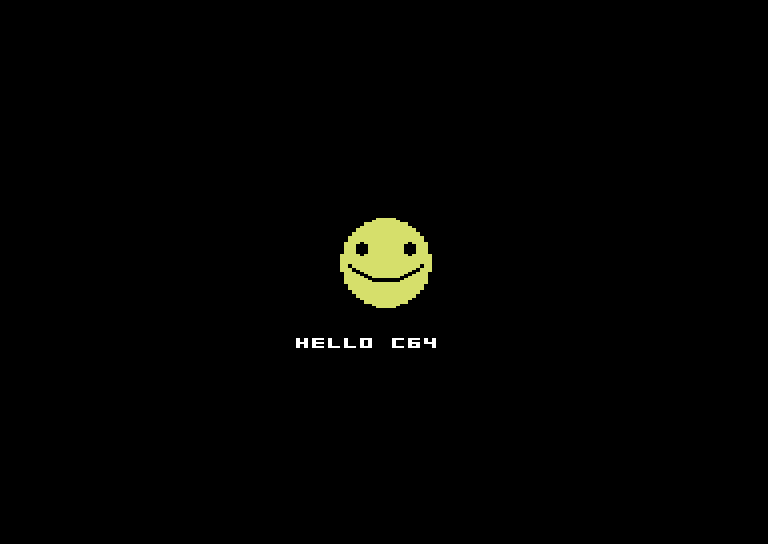
Or build the distributable - a .prg and an autostart .d64 disk image:
npx c64lua build examples/hello/main.lua -o hello.prg --d64 hello.d64That's the whole loop: write main.lua, run it, ship the .d64. Load the
disk on a real C64 (or the Ultimate) with LOAD"*",8,1 : RUN.
One C64 wrinkle: the multicolor pixel is 2:1 (double-wide), so a plain
circfillreads a touch wide on screen. The shippedexamples/hello/main.luaadds a tiny integer-onlydisc()helper (halve each span's x-extent) so the smiley in the screenshot above is perfectly round - see docs/DIFFERENCES.md for the fat-pixel details.
Unlike the NES, the C64 has a real framebuffer: video memory is plain RAM the
CPU can write at any time (VIC-II multicolor bitmap mode). So the full P8 draw
verb set works with no queue, no vblank budget, and no refusals:
cls/pset/line/rect/rectfill/circ/circfill/print/spr/pget. Its 16 fixed
hardware colors are the closest color-model kinship to PICO-8 of any console in
the family, and SID gives great-sounding sfx for very little driver code.
The honest cost: the C64 is ~1MHz with no blitter. It is the slowest pixel-pusher in the family. c64lua games look like PICO-8 games but budget like C64 games — see the perf model in docs/CHEATSHEET.md and the platform realities in docs/DIFFERENCES.md.
- Hardware: VIC-II multicolor bitmap mode, 160 x 200 native — each multicolor pixel is 2:1 (double-wide), so the displayed picture is 320 x 200 with 160 addressable columns, plus the hardware border.
- c64lua's canvas is 160 x 200, coordinates 0-159 x 0-199.
- Screenshots in this repo are integer-scaled (2x = 640 x 400) captures of the real emulator output, never resampled.
Start your own game by copying an example, then build with these flags:
npx c64lua build mygame/main.lua -o game.prg --d64 game.d64
# --dev     attribute-clash border flash + counter diagnostics
# --num8    8.8 fixed point (smaller/faster math, less range)
-o game.prgproduces the C64.prg;--d64 game.d64also wraps it into an autostart 1541 disk image (LOAD"*",8,1 : RUN, the format the C64 Ultimate and the demo scene load).npx c64lua run mygame/main.luabuilds and plays it in a window over the bundled VICE core, through the sharedromdev-core-runnerSDL host (the same one the whole SDK family and the romdev playtest tool use). The window needs@kmamal/sdl, an optional dependency of the runner.
Requirements: Node.js 24+, and nothing else -
npm install brings the cc65 toolchain (compiler + c64.lib + linker config)
as WebAssembly via romdev-toolchain-cc65. No native compiler, no VICE install.
c64lua speaks the same PICO-8-flavored subset as the rest of the luacretro
family (the shared front-end compiles it): 16.16 fixed-point numbers with
PICO-8 semantics, _init/_update/_update60/_draw callbacks, local-only
top-level declarations, structs via pool(), flat arrays via array(),
integer-typed locals inferred automatically. See
docs/CHEATSHEET.md for the full verb list and
docs/ASSETS.md for the color model + art pipeline.
| example | what it shows |
|---|---|
| hello | centered smiley + text (the "it works" cart) |
| pad-square | joystick + a hardware MOB sprite |
| mathcheck | fixed-point conformance (shared family goldens) |
| plasma | the framebuffer flex — full-screen CPU rendering |
- CHEATSHEET.md — every verb, the color table, the perf model.
- DIFFERENCES.md — 2:1 fat pixels + per-cell attribute clash, honestly.
- ASSETS.md — the P8↔C64 color mapping + PNG import.
c64lua compiles a PICO-8-flavored Lua dialect, not arbitrary PICO-8 carts.
luacretro 0.2.0 adds a second tier that compiles unmodified .p8 carts
(tables, closures, coroutines, strings), but it needs a 32-bit C compiler
with 64-bit integers and far more RAM than the C64 has (64 KB shared with the screen and the program), so it
targets the GBA (gbalua), the Genesis (mdlua) and sync32 instead. See
luacretro's DYNAMIC.md.
MIT. No AI attribution. See LICENSE.