




A free, open-source emulator frontend for Windows, Linux and macOS. Organize your ROM collection, let Easy Mode download and configure the emulators, and launch games with RetroAchievements, gamepad navigation, favorites and play history - plus your PC store games on Windows.
⬇ Download the latest release · Quickstart · FAQ · Compare · Privacy
Recommended - the installer. Download SimpleLauncher-{version}-win-x64-setup.exe (or
-win-arm64) from the latest release
and run it. It installs for your Windows account under %LocalAppData%\SimpleLauncher, adds Start
Menu shortcuts, and downloads the .NET 11 Desktop Runtime
only when it is missing (that runtime step asks for administrator approval; the app install does not).
Older releases only include the portable ZIP; use the ZIP steps in that case.
Portable ZIP. Prefer no installer? Download release_{version}_win-x64.zip (or -win-arm64),
extract it to a writable folder such as C:\Games\SimpleLauncher (not C:\Program Files), and run
SimpleLauncher.exe - or SimpleLauncher.Avalonia.exe for the cross-platform UI. Both apps share
the same settings.dat.
No account is needed either way. Uninstalling removes the program files but keeps your settings,
game lists and media; delete the install folder afterwards to remove everything. Newer releases
also publish SHA256SUMS.txt; verify a download with Get-FileHash (Windows) or
sha256sum -c (Linux/macOS) before running it.
Linux: use the AppImage (no runtime needed), the Flatpak, or the portable tar.gz/ZIP with the .NET 11 runtime - see Linux packages. macOS (Apple Silicon): open the DMG and drag Simple Launcher to Applications - see macOS package.
- Start the app. With no systems configured, the first-run wizard opens.
- Pick a system. Easy Mode downloads its emulator and core (and an optional image pack).
- Add your ROMs to the folder shown, then launch the game from the grid.
You can skip the wizard and use Easy Mode or Edit System later. Simple Launcher does not include ROMs, ISOs or BIOS files - use your own legally obtained dumps.
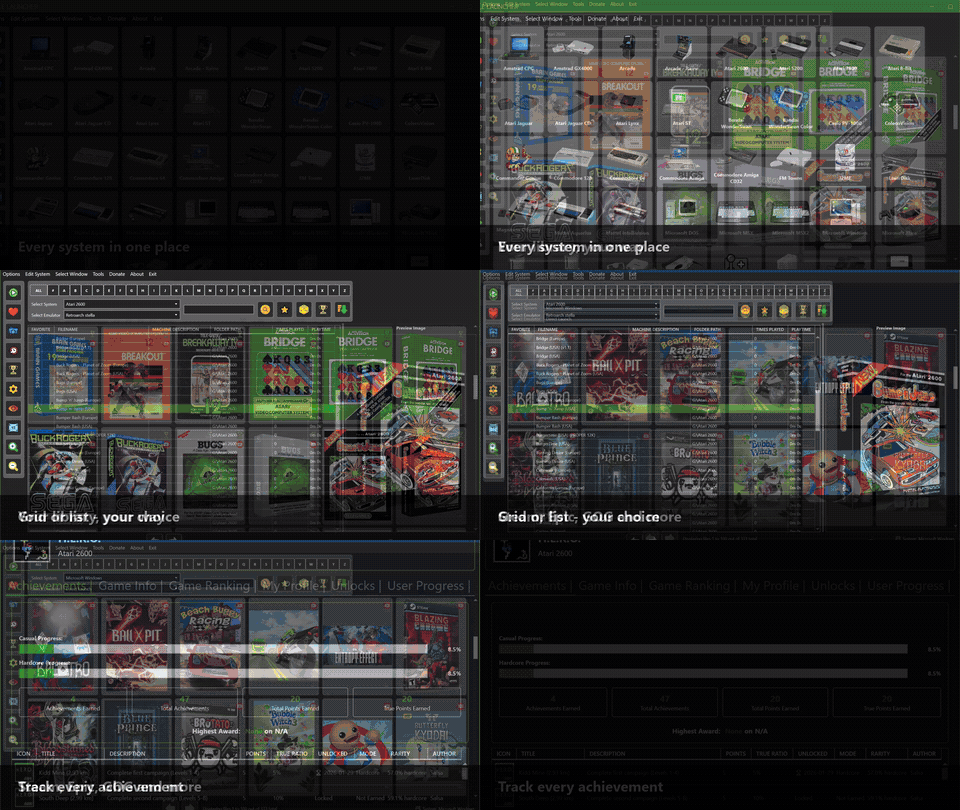
System selection, grid and list libraries, PC store games and RetroAchievements - or open the MP4.


- One-click setup. Easy Mode downloads and configures the emulator, core and image pack for the system you choose.
- Windows, Linux and macOS. The Avalonia app runs natively on x64 and ARM64 Linux and on Apple Silicon, not only Windows.
- RetroAchievements built in. Browse profiles, filter games by hash, and (on Windows) inject credentials into supported emulators automatically.
- Retro and PC libraries together. Scan 11 storefronts on Windows (Steam, Epic, GOG, Amazon and more) alongside your emulated systems, with one search and one play history.
- Bundled power tools. CHD/RVZ/XISO conversion, ROM validation, cover finding, and batch launchers ship with the app.
- Free and open. GPLv3, no ads, no account, and no third-party analytics. See the Privacy Policy for the small amount of data the app does send.
Want the longer story, including where the other frontends are stronger? Read the honest comparison with LaunchBox, ES-DE, RetroBat and Playnite.
| Quickstart | Install, first launch, Easy Mode, folder layout |
| FAQ | Runtime, Dokan/FUSE, saves, offline use, updates, Steam Deck |
| Comparison | Simple Launcher vs LaunchBox, ES-DE, RetroBat and Playnite |
| Privacy | What stays local, what is sent, how to disable reports |
| Documentation site | The full guides with a labeled side menu |
| Wiki | The same guides in wiki form, plus the emulator parameters reference |
| Changelog | Release history, also available in-app via Help -> Update History |
| Bug reports | Use the in-app Support Window or GitHub Issues |
Full feature list (click to expand)
- Unified Settings Database: Both apps share one SQLite
settings.dat(settings, favorites, play history, systems) with automatic migration of the legacy XML/dat files - MessagePack Engine: High-speed MessagePack serialization for near-instant settings loading
- Native ARM64 Support: ARM64 builds of the app and bundled tools for Windows on ARM (Surface Pro, Snapdragon X Elite) and Linux ARM64, alongside x64. The Windows ARM64 (WPF + Avalonia) and Linux ARM64 (portable tarball + AppImage) bundles are validated on real ARM64 hosts.
- Asynchronous Architecture: Multi-threaded game scanning and validation with a fluid UI - the Avalonia app shows the system-selection grid immediately and refreshes library counts in the background
- Fast Startup: System icons resolve through a short directory cache, and sidebar counts no longer block the first frame
- Single Instance Enforcement: The WPF and Avalonia apps share one guard, so only one of them runs at a time (launching the other brings the running one to the foreground)
- Elevation Detection: Automatically detects games requiring Administrator privileges
- Startup Validation: Detects if running from temporary folders and prompts for proper extraction
- Secure Connections: All metadata and image downloads use TLS 1.2/1.3
- Resilient Saving: Improved file lock handling with retry logic and exponential backoff
- Configuration Injection: Manage and inject settings directly into 20+ popular emulators:
- Ares, Azahar, Blastem, Cemu, Daphne, Dolphin, DuckStation, Flycast, MAME, Mednafen, Mesen, PCSX2, Raine, Redream, RetroArch, RPCS3, Sega Model 2, Stella, Supermodel, Xenia, Yumir
- Universal CHD Support: Built-in CHDMounter utility brings CHD support to emulators without native support - Dokan/WinFsp on Windows, FUSE 3 on Linux (falls back to on-the-fly conversion when FUSE is unavailable):
- RPCS3, Xemu, Xenia, Cxbx-Reloaded, Mednafen, PCSX Redux, 4DO, Gens, Blastem, Yabause, Mesen, FinalBurn Neo, FinalBurn Alpha, Raine, CD-i Emulator, Tsugaru
- On-the-Fly Mounting: Launch games directly from compressed (
.zip) or disk image (.iso,.xiso) files using Dokan integration (Windows); Xbox games in every SimpleXisoDrive container (.iso/.xiso/.cso/.zar, plus Xbox-ISO.chd) mount through SimpleXisoDrive for Xemu (virtualimage.iso) and Cxbx-Reloaded (mounteddefault.xbe). On Linux the Avalonia app mounts ZIP/7z/RAR launches through SimpleZipDrive (FUSE 3) and Xbox images through SimpleXisoDrive (FUSE 3), mounts CHD images through CHDMounter/FUSE, and keeps temp-extraction and managed conversion as automatic fallbacks - no Dokan needed - Expert Mode: Granular control over launch parameters, multiple ROM paths per system, and custom environment variables
- Format Conversion: Built-in converters for CHD, RVZ, XISO, 7z/Zip with integrity verification
- File Mounting Strategies: Advanced strategies for Xbox images (
.iso/.xiso/.cso/.zar/.chd), CHD (mount or convert), ZIP/7z/RAR (mount or extract), DOSBoximgmount, PBP-to-CUE, and CHD-to-CUE conversions
- Rich User Profiles: View RA stats, recently played games, and global rankings directly in the UI
- Auto-Credential Injection (Windows): Automatically syncs RA login to supported emulators (PCSX2, DuckStation, PPSSPP, RetroArch); the Emulator Integration UI is hidden on Linux/macOS
- Advanced Hashing: Built-in logic for precise hashes for complex systems (PS1, Saturn, Dreamcast)
- Hash-Based Compatibility Filter: The RA filter button matches games by file hash (scanned in the background and cached per system in
%LocalAppData%\SimpleLauncher\RetroAchievementsHashes\), replacing unreliable filename matching - Nintendo Wii Support: Full support for Wii RetroAchievements
- Expanded System Aliases: Better matching for NEC PC-FX, SNES MSU1, and many more systems
- RA Data Fetcher Tool: Separate tool for fetching RetroAchievements data
- Dual View Modes: Toggle between visual Grid View with customizable aspect ratios and detailed List View with sortable metadata
- Modern Game Store Integration: Automatic scanning for games from Microsoft Store (Windows Apps), Steam, Epic Games Store, GOG, Amazon Games, Battle.net, EA App, Humble Bundle, itch.io, Rockstar Games, and Uplay
- Fuzzy Image Matching: Intelligent algorithm to find cover art even with imperfect filename matches
- Play History Tracking: Detailed logs of play count, total playtime, and last played timestamps
- Global Search: Advanced search engine supporting
AND/ORoperators across the entire multi-system library - Favorites System: Mark and organize favorite games with persistent storage
- Gamepad Navigation: Full navigation support for Xbox and PlayStation controllers
- Pagination System: Efficient handling of large game libraries with batch loading
- Multiple Themes: Midnight (Deep Blue), High Contrast, and Adaptive mode syncing with Windows Light/Dark settings
- Filename Preferences: "Clean Up" filenames in Grid View or hide filenames entirely for a pure box-art look
- Font Size Control: Customize filename and machine-name font sizes in game buttons
- Separate Thumbnail Sizes: Independent zoom controls for system selection and game view
- Aspect Ratio Control: Customize game button aspect ratios
- Sound Configuration: Customizable sound effects for UI interactions
- Tray Icon Support: Minimize to the system tray with quick access
- Right-Click Context Menus: Extensive context menu options for games and systems
- Filter Menu System: Advanced filtering options for game libraries
- CHDMounter: Automatically handles CHD file mounting for emulators without native support
- Format Converters:
- CHDStudio: Convert, verify, and explore CHD images (Windows/Linux)
- RVZStudio: Convert, verify, and explore GameCube/Wii disc images (Windows/Linux)
- XISOStudio: Convert, verify, and explore Xbox/Xbox 360 images (Windows/Linux)
- BatchConvertToCompressedFile: Convert to 7z/Zip format
- Metadata & Cover Tools:
- FindRomCover: Intelligent cover art finder
- RetroGameCoverDownloader: Download retro game covers
- Batch File Creators:
- CreateBatchFilesForPS3Games: PS3 game launchers
- CreateBatchFilesForScummVMGames: ScummVM game launchers
- CreateBatchFilesForWindowsGames: Windows game launchers
- CreateBatchFilesForXbox360XBLAGames: Xbox 360 XBLA launchers
- Validation & Organization:
- RomValidator: Validate ROMs against No-Intro DAT files
- MAME.DatCreator: Create MAME DAT files
- SimpleZipDrive: ZIP file mounting utility
- SimpleXisoDrive: Xbox image mounting utility (XISO/CISO/ZAR/CHD)
- File System Tools: 7z integration for compression/decompression
- Easy Mode: One-click automatic download and configuration of emulators for chosen systems
- System Selection Screen: Visual system selection with customizable thumbnails
- Gamepad Dead Zone Configuration: Customize controller dead zones for precise navigation
- Fuzzy Matching Configuration: Adjust matching thresholds for cover art and metadata
- Play Time Tracking: Refactored from strings to seconds for better accuracy
- Global Statistics: View usage statistics and play time across all systems
- Image Viewer: Built-in image viewer for game art and screenshots
- Debug Window: Advanced debugging and error-reporting interface
- Update System: Built-in updater with a resilient update check (GitHub
releases/latestwith multi-source fallback when GitHub is unreachable or rate-limited) and one sharedUpdater.exethat updates either app (WPF or Avalonia) and relaunches the app that started it. Updates are refused when the app runs from a WinRAR/7-Zip temporary folder, interrupted swaps are recovered safely, and transient file locks/access denials are retried - Multi-language Support: 18 languages with a localization system
- Accessibility Features: Automation properties, access keys, and high contrast mode
- Nintendo: NES, SNES, N64, GameCube, Wii, Wii U, Switch, Game Boy, GBC, GBA, DS, 3DS, Virtual Boy, Famicom, Satellaview, 64DD
- Sony: PlayStation 1-4, PSP, PS Vita
- Microsoft: Xbox, Xbox 360, Windows, DOS
- Sega: Master System, Genesis, Saturn, Dreamcast, Game Gear, SG-1000, Model 3, Naomi, Naomi 2, Atomiswave
- Arcade: MAME, FinalBurn Neo, FinalBurn Alpha, Raine
- Retro Computers: Amiga, Amstrad CPC, Commodore 64, Commodore 128, ZX Spectrum, MSX, MSX2, Sharp X68000, NEC PC-88
- Classic Consoles: Atari 2600-7800, Jaguar, Lynx, ColecoVision, Intellivision, Neo Geo, Neo Geo CD, TurboGrafx-16, PC Engine, 3DO, CD-i
- Handheld/Mobile: J2ME (Java ME)
- Modern Platforms: ScummVM, Windows Store games, Xbox 360 XBLA
| Emulator | CHD Support | Notes |
|---|---|---|
| 4DO | ✅ Added | 3DO |
| Blastem | ✅ Added | Sega Genesis |
| CD-i Emulator | ✅ Added | Philips CD-i |
| Cxbx-Reloaded | ✅ Added | Original Xbox |
| DOSBox and variants | ✅ Added | Microsoft DOS |
| FinalBurn Alpha | ✅ Added | Arcade |
| FinalBurn Neo | ✅ Added | Arcade |
| Gens | ✅ Added | Sega Genesis |
| Kega Fusion | ✅ Added | Sega Genesis |
| Mednafen | ✅ Added | Multi-system |
| Mesen | ✅ Added | NES, SNES |
| PCSX-Redux | ✅ Added | PlayStation 1 |
| Raine | ✅ Added | Arcade |
| RPCS3 | ✅ Added | PlayStation 3 |
| Tsugaru | ✅ Added | FM Towns |
| Xemu | ✅ Added | Original Xbox |
| Xenia | ✅ Added | Xbox 360 |
| Yabause | ✅ Added | Sega Saturn |
- Framework: .NET 11 (WPF + Avalonia)
- Language: C# 15
- Data Serialization: Unified SQLite
settings.dat(settings, favorites, play history, systems), MessagePack (RA/MAME/history databases) & XML (legacy migration) - Dependencies: MahApps.Metro (UI), SharpDX (Input), SharpCompress (Archives), DokanNet (Mounting), NAudio 3 + NLayer (Audio; managed MP3/WAV on Linux/macOS), YamlDotNet, Tomlyn, PBPSharp - RetroAchievements hashing is delegated to the bundled
RetroAchievementsSharpCLI tool (tools\RetroAchievementsSharp\) - Architecture: Modular service-based architecture with dependency injection
- Storage: Unified SQLite
settings.datshared by both apps; legacysettings.xml/favorites.dat/playhistory.dat/system.xmlare migrated automatically on first launch
Simple Launcher is translated into 18 languages: English, Spanish, French, German, Italian, Portuguese (BR), Russian, Chinese (Simplified), Japanese, Korean, Arabic, Bengali, Hindi, Indonesian, Dutch, Turkish, Urdu, and Vietnamese.
- Bug reports: use the built-in Support Window or GitHub Issues.
- Documentation: documentation site and GitHub Wiki - guides, bundled-tool usage, and
parameters.mdwith official emulator download links. - Donate: if you find this project useful, consider supporting the developer.
⭐ If you like this project, please give it a star on GitHub! ⭐
This project is licensed under the GPLv3 License - see the LICENSE file for details. Simple Launcher is an emulator frontend and does not provide ROMs, ISOs, or BIOS files. See the Privacy Policy for data handling.