
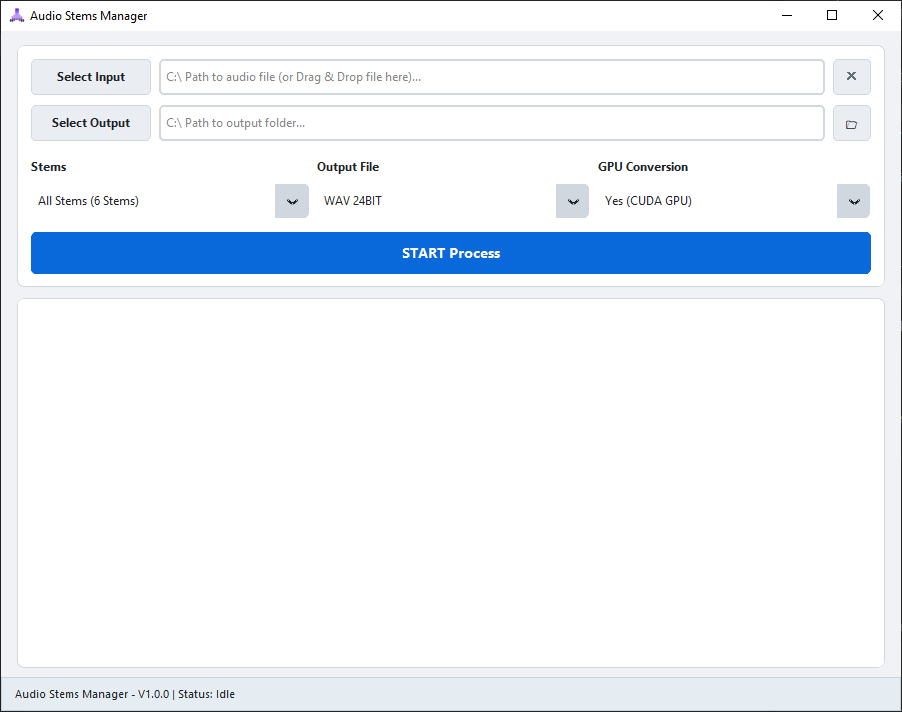


Audio Stems Manager (ASM) is a modern desktop application for high-quality AI-powered audio stem separation.
Separate a complete music track into individual instruments such as:
- 🎤 Vocals
- 🥁 Drums
- 🎸 Bass
- 🎸 Guitar
- 🎹 Piano
- 🎼 Other
No complicated setup.
No Python installation.
No command line.
No cloud upload.
Just drop your audio file into ASM, select the stems you want, and start separating.
ASM is designed to provide a simple studio-style workflow while using powerful AI models behind the scenes.
| Feature | Description |
|---|---|
| 🎤 Vocals Separation | Isolate vocals from the original track |
| 🥁 Drums Separation | Extract drums and percussion |
| 🎸 Bass Separation | Isolate bass frequencies and performances |
| 🎸 Guitar Separation | Extract guitar from the mix |
| 🎹 Piano Separation | Isolate piano and keyboard parts |
| 🎼 Other Separation | Extract remaining instruments and sounds |
| 🎯 Selective Stems | Choose only the stems you actually need |
| 🖱️ Drag & Drop | Simply drag audio files directly into ASM |
| 🎧 Multiple Formats | Supports MP3, WAV, FLAC, M4A, AAC, OGG and WMA |
| 💾 Multiple Export Formats | Export as WAV, FLAC or MP3 |
| 🎚️ MP3 Bitrate Control | Choose 320k, 256k or 192k |
| 📊 Real-time Progress | Monitor model loading, separation and export progress |
| ⚡ GPU Acceleration | NVIDIA CUDA acceleration through PyTorch |
| 🖥️ CPU Fallback | Automatically works without an NVIDIA GPU |
| 🔒 Local Processing | Audio processing happens directly on your computer |
| 📦 Portable | Standalone single-file Windows executable |
| 🚫 No Python Required | Everything required is bundled with the application |
ASM is designed around a six-stem workflow.
                    ┌─────────────────────┐
                    │     Original Song  │
                    └──────────┬──────────┘
                               │
                               ▼
                    ┌─────────────────────┐
                    │   AI Stem Engine    │
                    │    BS-RoFormer      │
                    └──────────┬──────────┘
                               │
          ┌────────────┬───────┼───────┬────────────┬────────────┐
          ▼            ▼       ▼       ▼            ▼            ▼
       Vocals       Drums     Bass   Guitar       Piano        Other
Each stem can be exported independently.
For example:
Original Song
     │
     ├── ✓ Vocals
     ├── ✓ Drums
     ├── ✗ Bass
     ├── ✗ Guitar
     ├── ✓ Piano
     └── ✗ Other
This allows you to process only the instruments you actually need.
ASM supports a wide range of common audio formats.
MP3
WAV
FLAC
M4A
AAC
OGG
WMA
WAV
FLAC
MP3
320 kbps
256 kbps
192 kbps
ASM can take advantage of NVIDIA GPUs to accelerate AI processing.
Recommended hardware:
NVIDIA GPU
6 GB+ VRAM
CUDA Support
Examples:
RTX 3060
RTX 3070
RTX 3080
RTX 4060
RTX 4070
RTX 4080
RTX 4090
More VRAM generally allows larger workloads to be processed more comfortably.
If a compatible NVIDIA GPU is not available, ASM can automatically fall back to CPU processing.
GPU acceleration is recommended for significantly faster processing.
Don't have an NVIDIA GPU?
No problem.
ASM includes CPU fallback support and can run on standard Windows computers.
RAM: 16 GB+
CPU: Modern 4+ core processor
Storage: SSD recommended
RAM: 8 GB
CPU: 64-bit processor
OS: Windows 10 / 11 64-bit
CPU processing will generally be slower than NVIDIA CUDA acceleration, especially for longer audio files.
Audio Stems Manager uses a modern AI-based source separation pipeline built around BS-RoFormer.
Band-Split Rotary Position Embedding Transformer
The architecture is designed for high-quality music source separation and is used as the core AI separation model in ASM.
The processing pipeline combines multiple components including:
BS-RoFormer
      │
      ▼
PyTorch
      │
      ▼
Audio Separation Engine
      │
      ├── CUDA / NVIDIA GPU
      │
      └── CPU Fallback
      │
      ▼
Audio Export
ASM also integrates supporting technologies such as:
- PyTorch
- Audio-Separator
- ONNX Runtime
- SoundFile
- FFmpeg
Using ASM is intentionally simple.
Drop Audio File
       ↓
Select Stems
       ↓
Choose Output Format
       ↓
Choose Output Folder
       ↓
Start Separation
       ↓
AI Processing
       ↓
Export Stems
No command line is required.
No Python environment is required.
No manual model installation is required.
Drag an audio file directly into the ASM window.
Supported examples:
song.mp3
song.wav
song.flac
song.m4a
Choose which stems you want to export.
For example:
☑ Vocals
☑ Drums
☐ Bass
☐ Guitar
☑ Piano
☐ Other
You can also use:
Select All
Deselect All
Select your preferred:
WAV
FLAC
MP3
320k
256k
192k
Choose where you want the generated stems to be saved.
Click the main separation button.
ASM will automatically handle:
Model Loading
      ↓
Audio Analysis
      ↓
AI Separation
      ↓
Stem Processing
      ↓
Audio Export
Progress and status information are displayed directly in the application.
If you process:
My Song.mp3
and select all six stems, ASM will generate files similar to:
My Song/
├── Vocals.wav
├── Drums.wav
├── Bass.wav
├── Guitar.wav
├── Piano.wav
└── Other.wav
If you select only Vocals and Drums:
My Song/
├── Vocals.wav
└── Drums.wav
Only the stems you select are exported.
Your audio stays on your computer.
ASM is designed around local processing.
The application does not require you to upload your music to a cloud-based separation service.
Audio processing is performed locally using the bundled AI processing stack.
ASM does not require:
- An online account
- A subscription
- Cloud processing
- Uploading your songs to a web service
Your audio stays on your machine.
ASM is distributed as a standalone Windows executable.
You do not need to manually install:
Python
PyTorch
CUDA Toolkit
ONNX Runtime
FFmpeg
SoundFile
Audio-Separator
The required runtime components are bundled with the application.
AudioStemsManager.exe
Download it and run it.
No traditional installer is required.
To keep the main executable self-contained, ASM uses a self-extracting model system.
On first launch, required model resources are extracted to:
%LOCALAPPDATA%\AudioStemsManager
The application can then use these local resources for subsequent processing.
This keeps the user-facing application simple while allowing the AI model and supporting resources to be managed locally.
Audio Stems Manager currently targets:
Windows 10
Windows 11
64-bit
- Go to the latest release
- Download the latest
AudioStemsManager.exe - Run the executable
- Start separating your audio
ASM is distributed as a standalone executable.
There is no Python installation or manual dependency setup required.
Windows Defender SmartScreen may display a warning when running a newly released or independently distributed executable.
If you downloaded ASM from the official GitHub repository and trust the release:
- Click More info
- Review the application information
- Click Run anyway
SmartScreen warnings can occur because a new executable has not yet established sufficient reputation with Microsoft's SmartScreen system.
Windows 10 64-bit
Windows 11 64-bit
CPU: Modern 64-bit processor
RAM: 16 GB+
GPU: NVIDIA CUDA GPU
VRAM: 6 GB+
Storage: SSD
CPU: 64-bit processor
RAM: 8 GB
GPU: Optional
Storage: Sufficient free disk space for application and AI models
NVIDIA CUDA-compatible GPU is recommended for faster processing.
CPU processing is supported as a fallback.
Processing time depends heavily on:
- Audio duration
- Audio sample rate
- Selected stems
- CPU performance
- NVIDIA GPU model
- Available VRAM
- System memory
- Output format
GPU acceleration can significantly reduce processing time compared with CPU-only processing.
Longer songs and higher-quality processing will naturally require more time and system resources.
New versions of Audio Stems Manager will be published through GitHub Releases.
When a new version becomes available:
- Open the latest release
- Download the newest executable
- Replace the previous version

Audio Stems Manager is built using a combination of open-source technologies.


Used as part of the AI inference and GPU acceleration pipeline.
Used for optimized model/runtime execution where applicable.
Used for audio decoding, encoding, conversion and media processing.
Used for audio file reading and writing.
Used as part of the audio source separation pipeline.
Huge thanks to the developers and contributors behind these open-source projects.
Audio Stems Manager is an independent project.
There is no company behind it.
No subscription model.
No artificial usage limits.
No complicated cloud platform.
The goal is simple:
Build a powerful audio stem separation tool that is easy enough for anyone to use.
Development will continue as the project evolves.
More improvements, optimizations and features may be added over time.
Audio Stems Manager is intended for legitimate audio production, editing, remixing, educational and personal use.
Users are responsible for ensuring that they have the necessary rights or permissions to process the audio files they use with the software.
The developers of Audio Stems Manager are not responsible for how users choose to use generated audio stems.
